I realize I'm joining the Final Cut Pro X conversation a little late in the game, but I tend to give things the benefit of the doubt, and honestly, I was a bit shocked and confused by what I was hearing regarding the new, download-only, "app" release. This New York Times article helps shed some light on the hysterical rants of the FCP community by pointing out some of the favorite features from FCP 7 which are just in different places in FCP X, and explaining how some features will be added later on. It's an article definitely worth reading.
Currently, I'm not too worried about Final Cut Pro X. As the article accurately points out, we're not yet obligated to upgrade, and FCP 7 is still working just as well as it ever did. My concern is where Apple is going to be taking FCP X in the future. If the future of Final Cut Pro is to become "iMovie Pro" then I will have to start shopping for and learning a new platform, like Avid or Adobe. However, I'm not ready to count FCP X out yet. I think Apple and Mr. Jobs have something up their sleeve.
Here's what I think is really going on. The FCP X which we have seen and been gossiping about is Apple's new entry level editing software. Within a relatively short time span, iMovie will unexist like in Orwell's 1984. Apple computers will come with absolutely no video post software OR a new program which will be more or less unusable. All home movie enthusiasts, and amateur film makers will have to cough up $300.00 to play Spielberg in their backyards.
What about the Pro level users you ask? The FCP X I speak of will act as the foundation for which Pro Level editors can begin to build a proper post platform. After downloading some upgrades and spending money on additional "apps", pluggins, 3rd part software/hardware, a Pro Editor will actually have built himself a Final Cut Pro X editing station which basically resembles a FCP 7 platform, but it will be able to background render and allows editing while ingesting media. FCP X will the Lego set of None Linear Editors, allowing users to add functionality and compatibility as they see fit.
I could just be in denial; the release of Final Cut X could be the end of pro level editing platforms from Apple, but what I've described above seems like a logical business model. Apple is a pretty sharp company, and I really can't believe they would just throw themselves under the bus. Why would they spend so many years building a pro level piece of software, as well as a faithful following, just to throw it all out?
What do you all think?
Showing posts with label Frey. Show all posts
Showing posts with label Frey. Show all posts
Thursday, July 7, 2011


Tuesday, March 8, 2011
Camera Slider and Crane/Jib All In One
My Facebook friend Giulio Sciorio tagged me in a post this afternoon. To my surprise, the video below is what I found.
I think the people at Floatcam really have an interesting take on the camera/jib combination. Kessler Crane has products which offer similar functionality, but they are quite a bit bulkier and not always easy to set up on the fly.
I haven't been able to find much information about the Floatcam Dollycrane but I am willing to wager some guesses based on the above video. The rails are probably made of aluminum and look very similar to the Igus DIY sliders. The rubber wheels look a lot like the Pegasus Cable Wheels sold by Cinevate and the counter balance system reminds me of the one on the Cinevate Atlas 10, except the Atlas 10 counter balance only worked for vertical operation
(I think). The mount for the slider is pretty unique in design, but seems to function like most tripod/camera slider mounts. There's also a clip in the video that leads me to believe there will be a hand crank or motor option for this production and if not, one should be pretty easy to fashion DIY style.
I can't find an exact price for this, but Giulio heard rumors of $4500 on Cinema 5D. I'm not sure what that price will include, but it could be a really good option for someone who hasn't already invested in a slider or jib.
Thanks for sharing the video Giulio.
If anyone has any more information on this product, please drop me an email, or leave something in the comments below.
I think the people at Floatcam really have an interesting take on the camera/jib combination. Kessler Crane has products which offer similar functionality, but they are quite a bit bulkier and not always easy to set up on the fly.
I haven't been able to find much information about the Floatcam Dollycrane but I am willing to wager some guesses based on the above video. The rails are probably made of aluminum and look very similar to the Igus DIY sliders. The rubber wheels look a lot like the Pegasus Cable Wheels sold by Cinevate and the counter balance system reminds me of the one on the Cinevate Atlas 10, except the Atlas 10 counter balance only worked for vertical operation
(I think). The mount for the slider is pretty unique in design, but seems to function like most tripod/camera slider mounts. There's also a clip in the video that leads me to believe there will be a hand crank or motor option for this production and if not, one should be pretty easy to fashion DIY style.
I can't find an exact price for this, but Giulio heard rumors of $4500 on Cinema 5D. I'm not sure what that price will include, but it could be a really good option for someone who hasn't already invested in a slider or jib.
Thanks for sharing the video Giulio.
If anyone has any more information on this product, please drop me an email, or leave something in the comments below.
Saturday, February 26, 2011
Disable AGC and Monitor Audio on Your Canon T2i
While this method has been effective at reducing the noise caused by the AGC, it has also reduced the overall recording volume of the camera, which is a problem when working with soft spoken talent. When I ran into this problem, I was at a bit of a loss for a way to fix it. I emailed Deejay of DSLRfilmnoob.com, and after much thought, he suggested using a headphone amplifier to boost the volume of the mic heading into the camera, kind of like a preamp. What a genius idea!
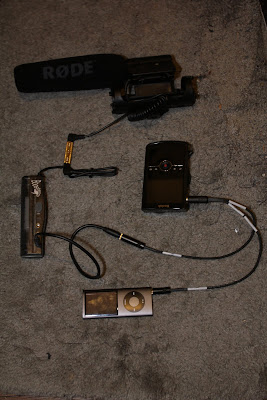
I did some searching on the interwebs, and found many different types of headphone amps, at many different prices. The Boostaroo Headphone Amp was on the cheaper side, could be found at any Radio Shack, and would output amplified audio to 3 devices. Since it had 3 output jacks, I could send one into the camera, and plug a headset into another. Below is an example of how I attached the headphone amplifier to my camera. The Kodak Zi8 stood in for my T2i since I was using it to take the photo.
To explain: the Rode Video Mic is connected to one end of a 1/8 female to 1/8 female coupler. The input of the Boostaroo Headphone Amp is plugged into the other end of the coupler. In the first output of the Boostaroo is a 1/8 male to 1/8 male audio cable which connects to the mic input of the Sescom Cable. My MP3 player is plugged into the AGC Disable end of the Sescom Cable, and this is all connected to the External Mic jack on my "T2i".
It's not shown in the above image, but you can add a pair of headphones to the Boostaroo and monitor the audio before it reaches the camera. It should be noted that the ideal place to monitor audio is when it's been passed through the camera, however, because of the constant tone played by the MP3 player to disable the AGC, you would only hear noise in your headset. If however you have a DSLR with manual audio controls, and an external monitor, check out Deejay's headphone hack.
While the Boostaroo did increase the gain of the microphone in my tests, it only increased it by 10-15db which didn't make a significant difference. The Boostaroo also lacks any type of volume control, it's either on or off, and when it's off, it decreases the recording volume and introduces a lot of noise. Finally, the Boostaroo ended up being much larger and heavier then I anticipated.
Although I will be returning the Boostaroo, it did prove proof of concept, so in it's place I have ordered the Micca Fiio e5. This unit is much smaller and lighter, has volume control, is rechargeable, has a much higher output power then the Boostaroo, is cheaper then the Boostaroo, and can often be purchased with a Y splitter like the package I linked to above. With the Y splitter you can add your headset and still be able to monitor the audio.
When the Micca Fiio e5 shows up I'll put together a video showing how I set it all up, and I'll include some tests.
Friday, January 7, 2011
More Time Lapse Tests
Happy Belated Holidays, and I hope the New Year is off to a good start for everyone. It's been a while since my last post, but I've had a lot of little projects in the works, and now they will start trickling in to the blog.
Today I want to continue discussing time lapse photography. To be honest, I'm still a bit mystified by time lapse, and based on some of the experts at Timescapes.org, it's no wonder. Although there is a lot which can be learned about shooting time lapse, getting that beautiful sequence relies, in large on luck. The members of the Timescapes.org forum have some great information up, but I've decided to continue shooting more tests with my T2I.
I've been comparing the different automatic modes on the camera, to figure out their best applications. Below is a video comparing the Av mode with the Tv mode. Neither of these clips have any color correction or de-blinking applied, they are straight out of the camera.
Av Mode: So Av mode is the cameras aperture priority mode. You set the desired aperture, and the camera automatically adjusts all other settings like shutter speed. The down side to using Av mode is it can make for an inconsistent time lapse. Look at the first clip, there are some sections where the lights on the cars are nice and streaked (there was less light in the shot so a lower shutter speed was used) and some shots where you can make out distinct details on the cars (there was a lot of light in the shot, so a faster shutter speed was used). The advantage to Av mode is it's ability to define your depth of field. If you were to shoot a time lapse of the sky, this is less of an issue since your lens will be focused to infinity, but if you have objects in the foreground and background, you will want to lock your aperture, otherwise you will see the focus change from shot to shot.
Tv Mode: Tv mode allows you to set the shutter speed, and automatically adjust the other elements, such as aperture to properly expose each shot. The plus to Tv mode is it allows you to have consist ant motion capture from shot to shot. Look at the second clip, the cars passing by the church all have that beautiful streaked look, except for the ones which got stuck at the light. Tv mode in my mind captures the essence of time lapse by allowing you to control how motion will be perceived in your final video. The down side to Tv mode is the automatic changing of aperture. If your lens isn't set to infinite, you will see the focus and depth of field shift between shots, which is really annoying. However, I've had no complaints shooting extremely wide shots, or sky shots in Tv mode.
Comparison and Other Thoughts: In comparing the two different modes in the above video, the blinking seems much more apparent in when using Av Mode. Although it's possible that nights conditions contributed to the blinking, the two streets had similar lighting and traffic flow. Although you can still notice the blinking in the street lights in the Tv mode clip, it's much more subtle.
Tv mode has become one of my favorite auto settings when shooting at an infinite focus point. Av mode would be useful if I were keeping one particular object in focus through out a time lapse, but I'm just not crazy about the change in motion captures. I find it distracting to see images go from streaky to clearly defined. However, which mode you use will depend on the effect your looking for and the circumstances under which your shooting.
Today I want to continue discussing time lapse photography. To be honest, I'm still a bit mystified by time lapse, and based on some of the experts at Timescapes.org, it's no wonder. Although there is a lot which can be learned about shooting time lapse, getting that beautiful sequence relies, in large on luck. The members of the Timescapes.org forum have some great information up, but I've decided to continue shooting more tests with my T2I.
I've been comparing the different automatic modes on the camera, to figure out their best applications. Below is a video comparing the Av mode with the Tv mode. Neither of these clips have any color correction or de-blinking applied, they are straight out of the camera.
Av Mode: So Av mode is the cameras aperture priority mode. You set the desired aperture, and the camera automatically adjusts all other settings like shutter speed. The down side to using Av mode is it can make for an inconsistent time lapse. Look at the first clip, there are some sections where the lights on the cars are nice and streaked (there was less light in the shot so a lower shutter speed was used) and some shots where you can make out distinct details on the cars (there was a lot of light in the shot, so a faster shutter speed was used). The advantage to Av mode is it's ability to define your depth of field. If you were to shoot a time lapse of the sky, this is less of an issue since your lens will be focused to infinity, but if you have objects in the foreground and background, you will want to lock your aperture, otherwise you will see the focus change from shot to shot.
Tv Mode: Tv mode allows you to set the shutter speed, and automatically adjust the other elements, such as aperture to properly expose each shot. The plus to Tv mode is it allows you to have consist ant motion capture from shot to shot. Look at the second clip, the cars passing by the church all have that beautiful streaked look, except for the ones which got stuck at the light. Tv mode in my mind captures the essence of time lapse by allowing you to control how motion will be perceived in your final video. The down side to Tv mode is the automatic changing of aperture. If your lens isn't set to infinite, you will see the focus and depth of field shift between shots, which is really annoying. However, I've had no complaints shooting extremely wide shots, or sky shots in Tv mode.
Comparison and Other Thoughts: In comparing the two different modes in the above video, the blinking seems much more apparent in when using Av Mode. Although it's possible that nights conditions contributed to the blinking, the two streets had similar lighting and traffic flow. Although you can still notice the blinking in the street lights in the Tv mode clip, it's much more subtle.
Tv mode has become one of my favorite auto settings when shooting at an infinite focus point. Av mode would be useful if I were keeping one particular object in focus through out a time lapse, but I'm just not crazy about the change in motion captures. I find it distracting to see images go from streaky to clearly defined. However, which mode you use will depend on the effect your looking for and the circumstances under which your shooting.
Thursday, October 28, 2010
DIY Shoulder Rig For $80 and Hoodman Loupe Modification Tutorial
Recently, IndieBudgetMovie left a very nice comment on my youtube video illustrating how to modify a Hoodman Loupe using a Delkin Pop-Up Shade so it can be attached directly to the LCD on your DSLR. If you haven't seen my Hoodman Modification Tutorial, and aren't happy with your LCD view finder and how it attaches, check out the tutorial above.
In any case, it turns out IndiBudgetMovie is a master of DIY as well, and put together this awesome video showing off an adjustable shoulder rig he made for $80 using a drywall square. What's great about this build is that it can easily be adjusted to fit many different types of shooters and styles. I've seen a lot of shoulder stabilizers built from PVC, which works well, unfortunately, once all the parts are connected, it can't be easily adjusted. This rig looks very solid, and not to difficult to build.
Combined with the Modified Hoodman Loupe, this will look like a pretty professional rig, and will be very functional. IndieBudgetMovie says he's going to try out my modification, so maybe he'll put together a follow up video. I'd be excited to see someone else using the modded Hoodman Loupe.
To date, this makes two people I know of who have used my tutorial to ditch the rubberbands, and secure their view finders in a better way.
I'm glad to see other people benefitting from it. After all, that's why I made the video in the first place.
In any case, it turns out IndiBudgetMovie is a master of DIY as well, and put together this awesome video showing off an adjustable shoulder rig he made for $80 using a drywall square. What's great about this build is that it can easily be adjusted to fit many different types of shooters and styles. I've seen a lot of shoulder stabilizers built from PVC, which works well, unfortunately, once all the parts are connected, it can't be easily adjusted. This rig looks very solid, and not to difficult to build.
Combined with the Modified Hoodman Loupe, this will look like a pretty professional rig, and will be very functional. IndieBudgetMovie says he's going to try out my modification, so maybe he'll put together a follow up video. I'd be excited to see someone else using the modded Hoodman Loupe.
To date, this makes two people I know of who have used my tutorial to ditch the rubberbands, and secure their view finders in a better way.
I'm glad to see other people benefitting from it. After all, that's why I made the video in the first place.
Tuesday, August 3, 2010
Vests are a Great Accessory for Any DSLR Cinematographer
I don't know why it took me so long to figure this out, but a Photographers Vest is a great way to transport your gear while shooting, be it a live event or a studio type of shoot.
I usually film live events, or work alone, so I am always looking for ways to transport and access my gear when on the move. I first started out with a Canon Back Pack, which was cheap, held a lot of gear, and was comfortable to wear. The down side to the back pack was that I had to take it off, and set it down if I wanted to swap lenses, or change filters. The other problem is that it was too big to get in and out of the smaller venues I was filming in.
I now have a Nikon Camera Bag which I really like. It was relatively cheap, and with some space management I was able to fit all 4 of my lenses, the camera body, a loupe, filters, extra battery and charger, and a few other goodies into this small sholder bag. It's much smaller then the back pack, and easier to get around with, but I still have to set it down to change lenses. Almost the perfect solution, but not quite there.
It hit me the other night while watching the Matrix. All bad ass guys have vests. Neo had one, Arnold in Predator, and Commando, El Deuche in Boondock Saints; and all for the same reason, all your gear is right at your finger tips. BINGO!!!! I found this Photographers Vest, and it's perfect. Upon arriving to a location shoot, I can take whatever lenses and filters I might need, stick 'em in the vest, set the camera bag aside, and get straight to shooting. If I need to swap lenses, I just grab the lens from one of the pockets, and BAMO, lens swap has taken place.
On little day trip shoots, I won't even have to bring the bag, I can pack everything I need right into the vest. If I were working on larger projects, I would have an assistant camera person who would carry the camera bag, or be in charge of guarding it, making sure nothing is stolen. Until then, this is an inexspensive and effective way for me to manage my gear on a solo shoot.
If you have another solution to dealing with your gear as a lone shooter, send me picks of your setup, or post me a comment and tell me about it.
I usually film live events, or work alone, so I am always looking for ways to transport and access my gear when on the move. I first started out with a Canon Back Pack, which was cheap, held a lot of gear, and was comfortable to wear. The down side to the back pack was that I had to take it off, and set it down if I wanted to swap lenses, or change filters. The other problem is that it was too big to get in and out of the smaller venues I was filming in.
I now have a Nikon Camera Bag which I really like. It was relatively cheap, and with some space management I was able to fit all 4 of my lenses, the camera body, a loupe, filters, extra battery and charger, and a few other goodies into this small sholder bag. It's much smaller then the back pack, and easier to get around with, but I still have to set it down to change lenses. Almost the perfect solution, but not quite there.
It hit me the other night while watching the Matrix. All bad ass guys have vests. Neo had one, Arnold in Predator, and Commando, El Deuche in Boondock Saints; and all for the same reason, all your gear is right at your finger tips. BINGO!!!! I found this Photographers Vest, and it's perfect. Upon arriving to a location shoot, I can take whatever lenses and filters I might need, stick 'em in the vest, set the camera bag aside, and get straight to shooting. If I need to swap lenses, I just grab the lens from one of the pockets, and BAMO, lens swap has taken place.
On little day trip shoots, I won't even have to bring the bag, I can pack everything I need right into the vest. If I were working on larger projects, I would have an assistant camera person who would carry the camera bag, or be in charge of guarding it, making sure nothing is stolen. Until then, this is an inexspensive and effective way for me to manage my gear on a solo shoot.
If you have another solution to dealing with your gear as a lone shooter, send me picks of your setup, or post me a comment and tell me about it.
Wednesday, July 28, 2010
The Film Makers Cooperative- Thank You to the Frugal Filmmaker
I just wanted to give a big thanks to Scott Eggleston, author of the Frugal Filmmaker for posting a link to my Hoodman Loupe tutorial. Scott is a valuable source of information, as well as an inspiration and example for the low/no budget film maker. With a variety of DIY projects, which are full functional, multi-applicable and often costing under $10 he proves it is possible for an aspiring film maker to stop aspiring, and start film making, no matter how small the budget may be.
Scott's willingness to provide links to valuable information, even if he isn't the author, speaks to his commitment to the independent film making community. The film industry is a difficult one to be in. By freely sharing information and working together, it might not be as difficult.
"One hand washes the other".
For some great DIY projects, and valuable tips and info on film making with a small budget, I strongly recommend checking out Scotts blog.
Scott's willingness to provide links to valuable information, even if he isn't the author, speaks to his commitment to the independent film making community. The film industry is a difficult one to be in. By freely sharing information and working together, it might not be as difficult.
"One hand washes the other".
For some great DIY projects, and valuable tips and info on film making with a small budget, I strongly recommend checking out Scotts blog.
Sunday, July 18, 2010
A Day of Equality, Acceptance, Joy, and Celebration- Gay Pride 2010
Gay Pride 2010 New York from David Frey on Vimeo.
Here is the video I shot and edited of the Gay Pride Parade in New York City. I shot this completely handheld, using a Canon Rebel T2i/550D with a Sigma 18-55mm f2.8-4.5 and a Canon EF 28-105mm f3.5-4.5.
I've lived in Greenwich Village my entire life, and never once saw the Pride Parade take place. I'm not big on crowds, or loud music, but when my boss from T.C.I. College said that he was going to be marching in the parade with some students, I figured it would be a great event to film.
On Sunday June 27th, My boss was late, and no where to be found, and the mob of students who were supposed to show up diminished to one young girl and her adorable daughter. It wasn't the turn out I was expecting, nor would the video I had intended on shooting work without students. However, it opened up some other possibilities.
While walking around the staging grounds looking for my boss, I saw the essence of the parade. The Pride Parade, in and of itself in philosophical terms. The Parade is about so much more then the organizations that march in it. It's about happiness, joy, equality, celebration of liberty, and well of course pride.
The original video idea was very different, more of a mini documentary of why students from T.C.I. were marching in the parade, but I'm very happy with how the project turned out. In fact, I had such a good time, seeing people just being happy and having fun, that I am hoping to participate and film in next years Gay Pride Parade.
Thursday, July 15, 2010
A Brooklyn Tale - DSLR Meet-Up with The DSLR Master Philip Bloom and the Love Of Filmmaking
Last night I left work early, gear bags in hand, and trecked my way out to Brooklyn Bridge Park for a DSLR meet- up hosted by Philip Bloom. I use the term hosted lightly, as Mr. Bloom's first priority was shooting some timelapse footage of the East River. For those who don't know, Philip Bloom is a bit of a rock star for many DSLR cinematographers as he has strove to prove that they are a viable tool for film making.
I wasn't sure what to say to the man when I met him. Being a bit of a celebrity in my mind, I didn't want to being like a teenager at a Back Street Boys concert, so I did what I'm best at... made some jokes and got a chuckle out of him.
Our conversation pretty much ended at that, but what was nice to see is how light hearted he is. Watching him jump from camera to camera checking the timelapses, and seeing the smile when the shots looked good, reminded me of the reason I wanted to be a filmmaker in the first place. It's not about the gear, or the budget of the production, it's about the love of making films.
By some stroke of luck, the weather cleared up for us, only relapsing into a light drizzle for about 10 minutes. I got some really great shots of the sun coming down over the New York skyline, and there will be a video posted up shortly.
I met some really nice people at the event, and was surprised by how many of them came up to speak with me. Many of the conversations revovled around my camera support system which really surprised me. It's nothing special or fancy, but maybe less common among the DSLR users.
The people attending the event seemed to be split into three distinct groups. There were the talkers, the doers, and then some people that floated in between the two. Some of the talkers brought gear, I met a few who brought nothing, and they just kind of floated around chatting about filmmaking, and gear, and the industry. Many people in this group talked alot about buying gear, but not very much about working with it. I got the sense that many of these people picked up a DSLR as a hobby.
The doers had their priorities straight, They came to film, not to talk, and although they paused for a brief conversation, they would go straight back to shooting. Philip was one of the doers, as well as Brian Russell. I had a very interesting conversation with Brian as things were winding down at the end of the night regarding the advantages of using DSLRs in small/location shoots, as well as ways to use youtube and a blog for marketing.
I fit some where in the middle group maybe closer to the doers. Upon arriving at the meet- up, I went straight to setting up my gear. I wanted to go down and shoot by the Brooklyn Bridge for weeks, so I didn't want to waste the opportunity chatting away. Once my gear was set up, I spoke to people as they approached me, shooting video in between the beats of the conversation. I think there's one factory that seperates me from the doers. They make a living as a filmmaker. I still haven't reached that point.
I think working a full time job is slowing down the process of becoming a full time filmmaker. Many of the professional cinematographers I spoke to dove in head first. They had enough money saved to not work a 9-5er, leaving a lot of time to make films, post them on the internet, build an audience, and find paying clients. I work on my projects when I get home from the day job, which makes it very hard to turn projects around quickly. With this schedule, it usually takes me 1-2 weeks to edit footage from a days shoot.
I never thought I'd say this, but I miss working at Metro Bicycles just for how much free time I had. I only worked three days a week which left me lots of time to work on film projects. With that schedule I could turn out two short films a week. Look at Brian Russell's awesome video from the event. He shot the footage, cut it together and had it posted on vimeo last night.
Well until I save the money, I guess I'll continue sleeping less and editing more.
I wasn't sure what to say to the man when I met him. Being a bit of a celebrity in my mind, I didn't want to being like a teenager at a Back Street Boys concert, so I did what I'm best at... made some jokes and got a chuckle out of him.
Our conversation pretty much ended at that, but what was nice to see is how light hearted he is. Watching him jump from camera to camera checking the timelapses, and seeing the smile when the shots looked good, reminded me of the reason I wanted to be a filmmaker in the first place. It's not about the gear, or the budget of the production, it's about the love of making films.
By some stroke of luck, the weather cleared up for us, only relapsing into a light drizzle for about 10 minutes. I got some really great shots of the sun coming down over the New York skyline, and there will be a video posted up shortly.
I met some really nice people at the event, and was surprised by how many of them came up to speak with me. Many of the conversations revovled around my camera support system which really surprised me. It's nothing special or fancy, but maybe less common among the DSLR users.
The people attending the event seemed to be split into three distinct groups. There were the talkers, the doers, and then some people that floated in between the two. Some of the talkers brought gear, I met a few who brought nothing, and they just kind of floated around chatting about filmmaking, and gear, and the industry. Many people in this group talked alot about buying gear, but not very much about working with it. I got the sense that many of these people picked up a DSLR as a hobby.
The doers had their priorities straight, They came to film, not to talk, and although they paused for a brief conversation, they would go straight back to shooting. Philip was one of the doers, as well as Brian Russell. I had a very interesting conversation with Brian as things were winding down at the end of the night regarding the advantages of using DSLRs in small/location shoots, as well as ways to use youtube and a blog for marketing.
I fit some where in the middle group maybe closer to the doers. Upon arriving at the meet- up, I went straight to setting up my gear. I wanted to go down and shoot by the Brooklyn Bridge for weeks, so I didn't want to waste the opportunity chatting away. Once my gear was set up, I spoke to people as they approached me, shooting video in between the beats of the conversation. I think there's one factory that seperates me from the doers. They make a living as a filmmaker. I still haven't reached that point.
I think working a full time job is slowing down the process of becoming a full time filmmaker. Many of the professional cinematographers I spoke to dove in head first. They had enough money saved to not work a 9-5er, leaving a lot of time to make films, post them on the internet, build an audience, and find paying clients. I work on my projects when I get home from the day job, which makes it very hard to turn projects around quickly. With this schedule, it usually takes me 1-2 weeks to edit footage from a days shoot.
I never thought I'd say this, but I miss working at Metro Bicycles just for how much free time I had. I only worked three days a week which left me lots of time to work on film projects. With that schedule I could turn out two short films a week. Look at Brian Russell's awesome video from the event. He shot the footage, cut it together and had it posted on vimeo last night.
Well until I save the money, I guess I'll continue sleeping less and editing more.
Monday, July 12, 2010
My Entry Into the Independent Film World- Juan and Emmet Trailer Rough Cut
Here is a trailer for the first independent feature film I worked on, "Juan and Emmet", directed by Alan Baxter. Due to some actors relocating and a lack of funds, the production was temporarily put on hold, but has recently resumed.
This film holds a special place in my heart for two reasons. While working as a gaffer for the bar scene (seen in the above trailer) I had one of those "Aha" moments, realizing that I would not be truly content until I was working in film. This was also the first project I was PAID to edit.
Although it was a small indy film, I learned a lot while working on it, and met a lot of great people. For those aspiring film makers who may be reading this, there's two things you should take away when you leave this page.
- Every experience you have working in production is a good one. No matter the size or the budget, you always stand to learn something and your always bound to meet other people in production.
- You don't need to have a lot of money to be a successful film maker. If you have a good script, and enough money to feed your actors and crew, you can make a film. Having a good script is even arguable. Your film just has to be good enough to sell it. Having just saw a preview for Piranha 3D, it doesn't seem like you have to do much to sell a film these days.
I just want to conclude by thanking Alan Baxter, AB productions, and all the people I am working with on Juan and Emmet. I've learned a lot and it's a lot of fun working with you all.
The Coolest Thing I've Seen This Week- iPhone 4 Movie "Apple of My Eye"
iPhone 4 film - "Apple of My Eye" from Michael Koerbel on Vimeo.
Apple has been setting the benchmark for technological advancements for some time now, but looking at the above video, it's clear, they have outdone themselves. The small crew that worked on the picture used some creativity, ingenuity, and an iPhone 4 to make a beautiful short film.
Now people have made films on their phones before, but there are two things to be considered. Firstly, this is not a clip of someone jumping off a roof into a pool of green jello, this is an emotional, narrative piece. Bringing us to the second point, this film was edited. Do you know where? Yep, on the iPhone. It was shot, edited and rendered on a CELL PHONE!!!!
I realise the technology isn't old, but to actually see it put to use, and done exceedingly well excites the heck out of me. I thought it was cutting edge to work my editing wonders on a laptop, but now that's old hat. I love technology.
Thursday, July 8, 2010
A look at the New Zoom H1

While browsing the web today I saw that Zoom is releasing the new H1 at the end of the month. Being that I'm not a super cool tech reviewer, I haven't gotten my hands on one yet, but from reading the specs on it, here's my two cents.
It looks like a great option for the novice, or budget film maker. For $100 you are able to record audio separately from video, a huge advantage for any film maker, particularly when recording to a tape based media. Why you might ask? Because the motors and gears in tape based camcorders tend to leave a lot of hum and buzz in your audio which is a pain in the butt to clean up. Having someone else record audio also means you have someone to monitor sound levels.
There's 3 things which should be considered before running out and buying this. Believe me, at that price, it's easy to just drop the cash. First, figure out what mics you already have. If they are all mini 3.5mm jacks, then your in business as that's what the mic input is on the H1. Secondly, do you think you may use XLR mics in the future. Sure you could find ways to adapt your gear in the future, but I'm of the mind set "buy once, buy right". In short, I try and buy products that will grow with needs. Third, how do you feel about the Micro SD card medium? Personally, I'm not crazy about it. Working with the T2i, I'm using SD, and SDHC cards, and many of my other gadgets also use SD/SDHC cards, meaning I have tons of cards laying around that I can use interchangeably with my gear.
Granted, it wouldn't be much trouble to stock up on some Micro cards, but, they would only be used for that device. If I'm going to spend the money, I'd rather it be on something I can use with my other gear.
Well, thats my rant for the day. If you guys have some thoughts on it, I'd love to hear them. Just drop me a comment down below.
Wednesday, July 7, 2010
Taking Care of Business, What's Happening, and A Note to the Readers
This post may be a little on the loopy side, as it is so hot my brain is melting.
Firstly, I wanted to thank the people who read my blog. I know there aren't many of you at this early stage, but I do sincerely appreciate it. Knowing that other people read what I write will hopefully encourage me to make more interesting posts, rather then running on and on about the technical specs of the new toy I want to buy. Please feel free to ask me questions, tell me my writing is terrible, or suggest things you would like to read more about. Anne, thanks for checking me out. I know your a photo head, so I'll try and throw some stuff in there about shooting stills as well as all the video banter.
Now, on to business. I've got quite a few things on the burner. I've shot all the footage of the BoCoCa Arts Festival, so, in the near future you can expect to see another promo video, as well as a short documentary on the event. Here is the original BoCoCa Arts Festival Promo which ran before the show started.
I've started editing the footage from Gay Pride, so that should be up soon as well. I got some really great shots, and looking over the clips made me smile, for the simple fact that every one involved in the parade is happy and enthusiastic.
I'm also planning on doing some techi videos. One just showing what gear I'm using for those who are wondering, and some video reviews of some key pieces of gear. When I purchased some of these things, there were no video reviews available, and it would have been a big help in making an informed purchase to have seen some. So that I have the gear, why not make a review about it.
Firstly, I wanted to thank the people who read my blog. I know there aren't many of you at this early stage, but I do sincerely appreciate it. Knowing that other people read what I write will hopefully encourage me to make more interesting posts, rather then running on and on about the technical specs of the new toy I want to buy. Please feel free to ask me questions, tell me my writing is terrible, or suggest things you would like to read more about. Anne, thanks for checking me out. I know your a photo head, so I'll try and throw some stuff in there about shooting stills as well as all the video banter.
Now, on to business. I've got quite a few things on the burner. I've shot all the footage of the BoCoCa Arts Festival, so, in the near future you can expect to see another promo video, as well as a short documentary on the event. Here is the original BoCoCa Arts Festival Promo which ran before the show started.
I've started editing the footage from Gay Pride, so that should be up soon as well. I got some really great shots, and looking over the clips made me smile, for the simple fact that every one involved in the parade is happy and enthusiastic.
I'm also planning on doing some techi videos. One just showing what gear I'm using for those who are wondering, and some video reviews of some key pieces of gear. When I purchased some of these things, there were no video reviews available, and it would have been a big help in making an informed purchase to have seen some. So that I have the gear, why not make a review about it.
Subscribe to:
Posts (Atom)


 Posts
Posts

