Showing posts with label Audio. Show all posts

Saturday, February 26, 2011

Disable AGC and Monitor Audio on Your Canon T2i


For the past few weeks, I've been using the Sescom AGC Disabling Y Splitter Cable and a MP3 player to defeat the Automatic Gain Control on my Canon T2i. If your not familiar with how this works, check out Dave Dugdale's blog. He does a great job explaining the process and even provides a free MP3 download to put on your music player of choice.

While this method has been effective at reducing the noise caused by the AGC, it has also reduced the overall recording volume of the camera, which is a problem when working with soft spoken talent. When I ran into this problem, I was at a bit of a loss for a way to fix it. I emailed Deejay of DSLRfilmnoob.com, and after much thought, he suggested using a headphone amplifier to boost the volume of the mic heading into the camera, kind of like a preamp. What a genius idea!
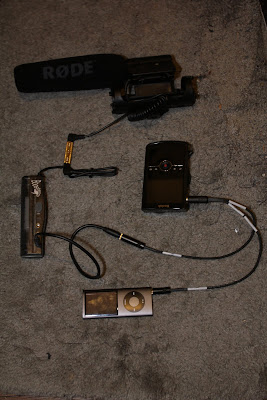
I did some searching on the interwebs, and found many different types of headphone amps, at many different prices. The Boostaroo Headphone Amp was on the cheaper side, could be found at any Radio Shack, and would output amplified audio to 3 devices. Since it had 3 output jacks, I could send one into the camera, and plug a headset into another. Below is an example of how I attached the headphone amplifier to my camera. The Kodak Zi8 stood in for my T2i since I was using it to take the photo.

To explain: the Rode Video Mic is connected to one end of a 1/8 female to 1/8 female coupler. The input of the Boostaroo Headphone Amp is plugged into the other end of the coupler. In the first output of the Boostaroo is a 1/8 male to 1/8 male audio cable which connects to the mic input of the Sescom Cable. My MP3 player is plugged into the AGC Disable end of the Sescom Cable, and this is all connected to the External Mic jack on my "T2i".

It's not shown in the above image, but you can add a pair of headphones to the Boostaroo and monitor the audio before it reaches the camera. It should be noted that the ideal place to monitor audio is when it's been passed through the camera, however, because of the constant tone played by the MP3 player to disable the AGC, you would only hear noise in your headset. If however you have a DSLR with manual audio controls, and an external monitor, check out Deejay's headphone hack.

While the Boostaroo did increase the gain of the microphone in my tests, it only increased it by 10-15db which didn't make a significant difference. The Boostaroo also lacks any type of volume control, it's either on or off, and when it's off, it decreases the recording volume and introduces a lot of noise. Finally, the Boostaroo ended up being much larger and heavier then I anticipated.

Although I will be returning the Boostaroo, it did prove proof of concept, so in it's place I have ordered the Micca Fiio e5. This unit is much smaller and lighter, has volume control, is rechargeable, has a much higher output power then the Boostaroo, is cheaper then the Boostaroo, and can often be purchased with a Y splitter like the package I linked to above. With the Y splitter you can add your headset and still be able to monitor the audio.

When the Micca Fiio e5 shows up I'll put together a video showing how I set it all up, and I'll include some tests.

Wednesday, October 6, 2010

How to Run a Dual System Film Shoot

I was recently asked to edit footage filmed using a dual system setup (video and audio recorded to two seperate devices). Recording audio seperately from video is one of the best ways to increase production value, but only if it is done properly. Based on the material I was asked to edit, I realized some people may know what is needed for dual system recording, but don't know what steps to take for their efforts to be effective. With that in mind, here is a quick guide on how to run a dual system shoot. Getting the best quality is a discussion best left for another post, this is simply a Dual System Recording for Dummies Guide if you will.

The most important thing to remember when using dual systems is that you need to record a visual AND audio cue in order to sync audio and video in post production. We've all seen behind the scenes footage were a crew member calls out the scene and take number, and proceeds to slam the gate on the clapper. This way the editor has visual data to connect to audio data. In the footage I was given, a clapper was clearly labeled, and used properly, only no one on set called out the scene or take number, meaning the audio files have no discernable information. They only have a clap, and the line reading, making it nearly impossible to match them to the video.

Another key step is making sure your camera and audio recorders, are recording audio at the same bit rates. If your camera records audio at 44.1bits, and your audio recorder records at 48bits, you will get what is called drifting in post production. Drifting is when your audio and video are in sync at the beginning of a take and drift out of sync by the end of it. this is because your audio and video are playing back at two different rates. The numbers above were just examples, as these numbers will vary based on the equipment your using. For more information, refer to the owners manual for your gear.

These are essential steps to follow. If they are ignored, you could have the best quality audio and video imaginable, but they will be nearly useless, as syncing them up in post production will be near impossible.

Tuesday, September 7, 2010

Fashion Week and Up Coming Events

The past few weeks have been quite busy for me. I've been helping Andrew Bellware on the set of his new film Earthkiller by filling in as a Gaffer, running production audio, playing a zombie, constructing sets and just about anything else that needed to be done during the course of a day's shoot. It's been a lot of fun.

I offered to replace the photographer my Father's company usually uses to photograph art work for appraisals, but it's been such a legistical nightmare, I haven't had a chance to shoot yet. I think we've finally hammered down a schedule, and I should start shooting later this week. I'm looking forward to shooting some stills with the T2i. I shot some pictures of the sunset last week, and they came out great, so I have little doubt in the camera's ability to shoot great pictures.

It looks like I've landed a paid gig filming an event during fashion week. I found a highschool friend on Facebook, and it turns out she has built a rather successful fashion blog, and was interested in including some videos to compliment the print media in her posts. The details are vague at this point, but more information will follow shortly. It looks like the first shoot will be this Friday.

Thursday, August 26, 2010

The Canon 60D Has Been Announced!


Canon recently posted this press release announcing the Canon 60D. For those DSLR film makers who already own a Rebel T2i/550D or better, this isn't too ground breaking, but for those who have yet to purchase a DSLR for it's video features, this is great news.

The 60D is replacing the older 50D, and as far as specs and features, sits in the middle of the T2i and the 7D. The above press release gives a full break down of the camera's features, but here are a few that make this camera a great buy for the new DSLR film maker
  • 3 inch articulated rear LCD screen (great for low angle or high angle shots)
  • Manual Audio Controls (not during video recording, but you can preset before shooting)
  • Manual Exposure Controls (incremented in 64 steps like the latest firmware update for the 5D)
  • The ability to trim video clips in camera (saves time in post production)

For those shooting stills as well as video, the camera boasts 5.3 shutter cycles per second (faster then the T2i but slower then the 7D) and the ability to process RAW files in camera, among many other features.

For T2i and 7D owners; the internals of the 60D aren't much more advanced then the cameras you own, so I wouldn't run out and place and order. The articulated screen and manual audio are nice, but by now, you've probably purchased an external monitor and Zoom H4N for audio. I would start saving some money, because I think it will be a short time before Canon releases a camera able to shoot in RAW, or a full frame camera with all of the erganomic features the 60D is flaunting.

If you've yet to purchase a DSLR, and are working on a tight budget, this is a great camera for you. The addition of the articulated screen and manual audio control alone will save you money on accessories. Combined with the other features, this is a powerful camera, great for the aspiring DSLR film maker.